Here you will find the complete project, including the latest enhancements that introduce WiFI to the project. With some simple use of Virtual Serial ports and Telnet we can now access the controller from afar via a Port “in my case telnet 23”. As I already own a WizNet Wiz125SR and use WizNEt VSP software to remote control my Yaesu FT847 on Port 5001.
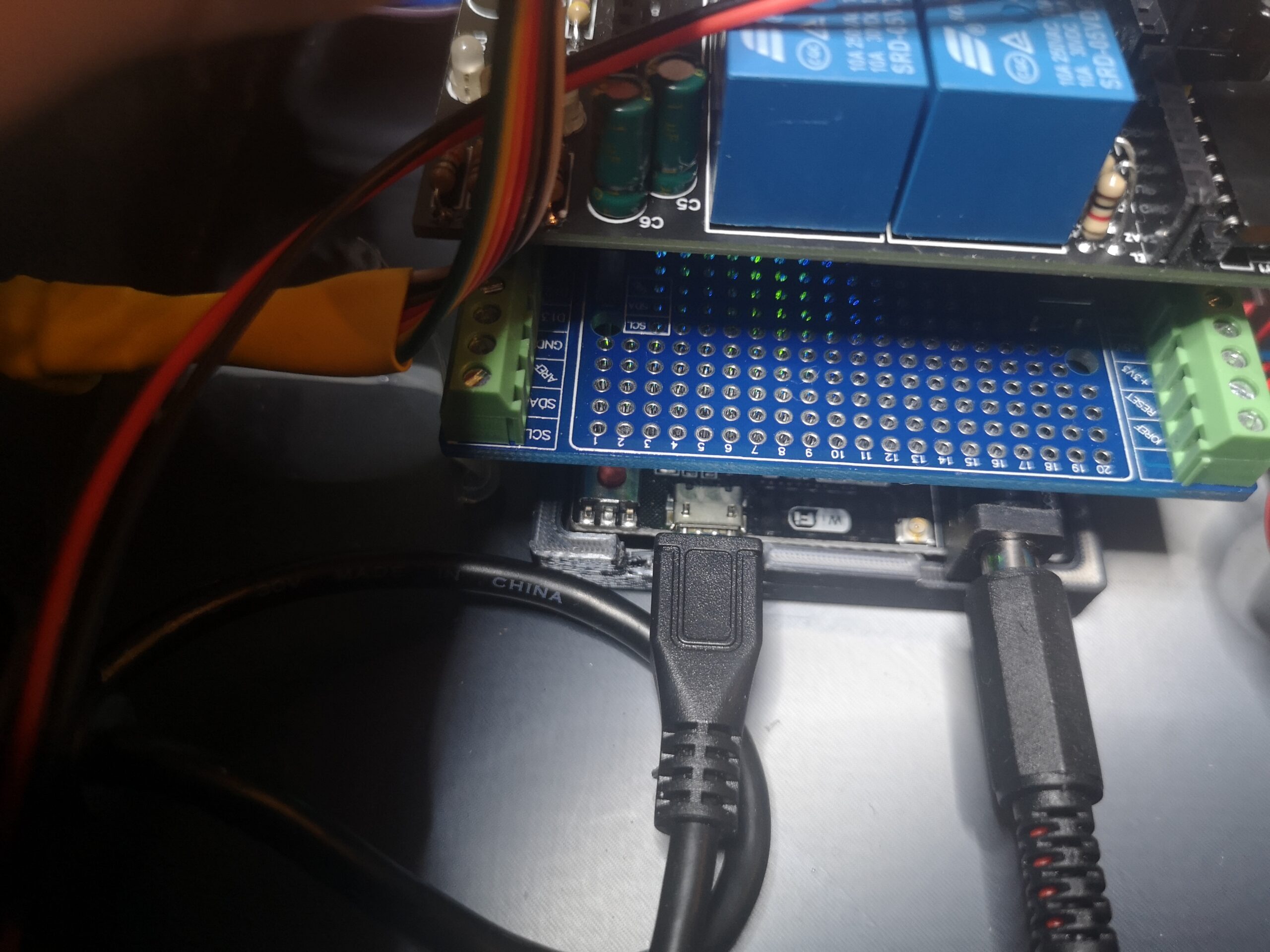
If you are not familiar with the Wiz125SR, it is in a nutshell 2 x RS232 ports to an Ethernet bridge. Running the Virtual Serial Port software and creating Virtual Ports then allows to to set and access local COM ports as if you were seated next to your equipment. This is of course done over TCP/IP. Port 5001 and 5002 respectively for each onboard RS232 port. Be WARNED though? the Wiz125SR logic is not 3.3v or 5v UART and would require either a MAX232 to MAX3232 (3.3v version of the MAX232) to handle logic into say an Arduino or Raspberry Pi. With that said the K3NG controller thankfully has what I envisioned early on as a future need for connectivity and opted to install a Wemos Mega2560 Wifi. This consists of a Arduino Mega2560 and ESP8266 combined on the same board. A switch then allows you to either USB to MCU for example or ESP8266 to MCU.
For our purposes we are going to need the ESP8266 to USB and the special function switch to ensure the ESP8266 acts as a WiFi bridge to the USB port. Naturally some additional programming is required for the ESp8266 that is outside of the scope of the K3NG project.
Unfortunately I cannot find any Wemos Mega2560 Wifi branded boards on the Internet, however, an equivalent can be bought from online stores for around £9 ($11).
Below is an example of the switch configuration in the form of a truth table.
Table DIP- switch:
| Connection | DIP | ||||||
| 1 | 2 | 3 | 4 | 5 | 6 | 7 | |
| ATmega2560<->ESP8266 | ON | ON | OFF | OFF | OFF | OFF | OFF |
| USB <->ATmega2560 | OFF | OFF | ON | ON | OFF | OFF | OFF |
| USB<->ESP8266 (Update firmware or sketch) | OFF | OFF | OFF | OFF | ON | ON | ON |
| USB<->ESP8266 (communication) | OFF | OFF | OFF | OFF | ON | ON | OFF |
| All independent | OFF | OFF | OFF | OFF | OFF | OFF | OFF |
Special Solution:
USB <->ATmega328<-> ESP8266
| DIP | SWITH 2 | |||||||
| Connection | 1 | 2 | 3 | 4 | 5 | 6 | 7 | |
| USB <-> ATmega2560<-> ESP8266 | ON | ON | ON | ON | OFF | OFF | OFF | To RXD3/TXD3 |
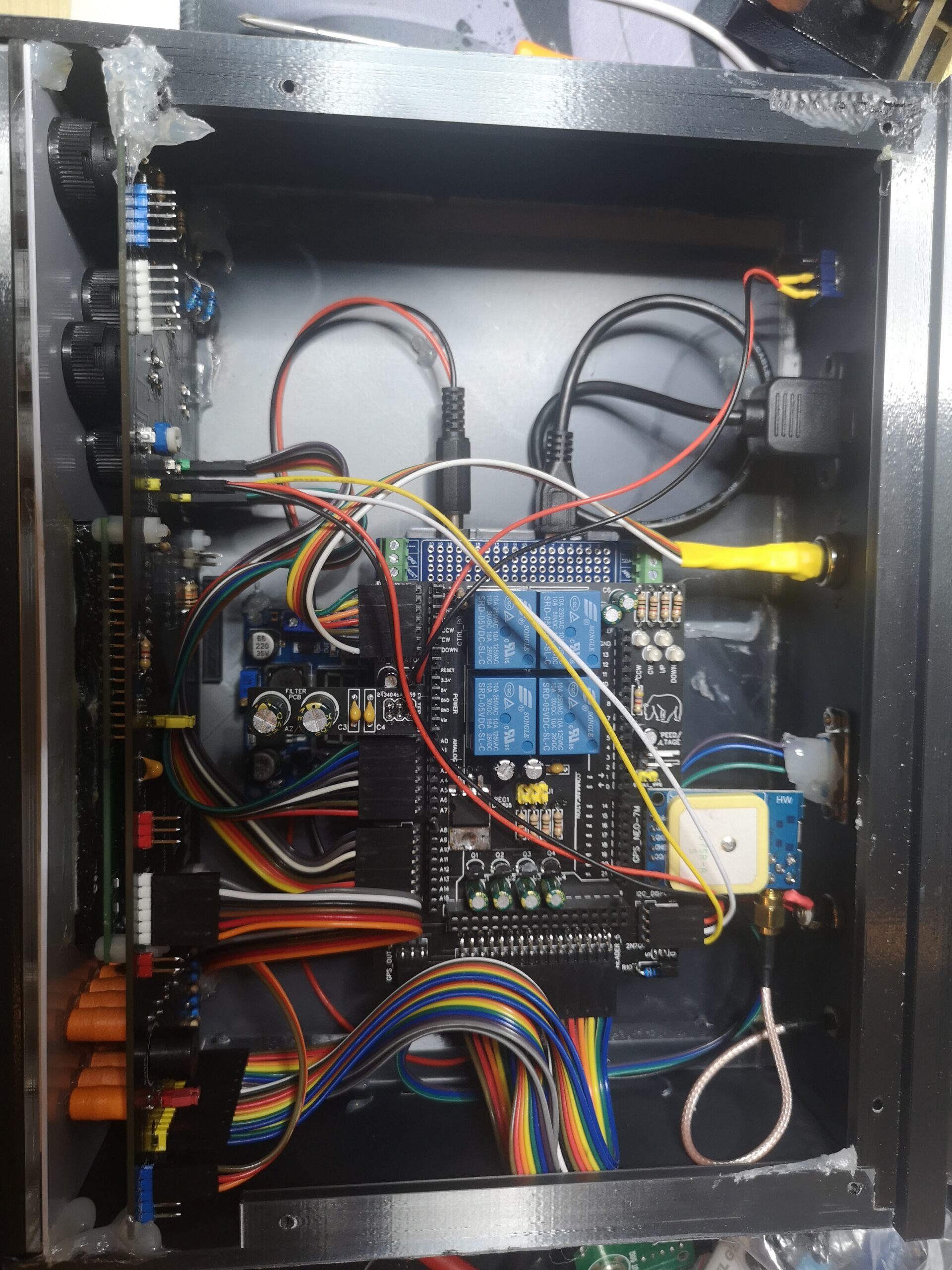
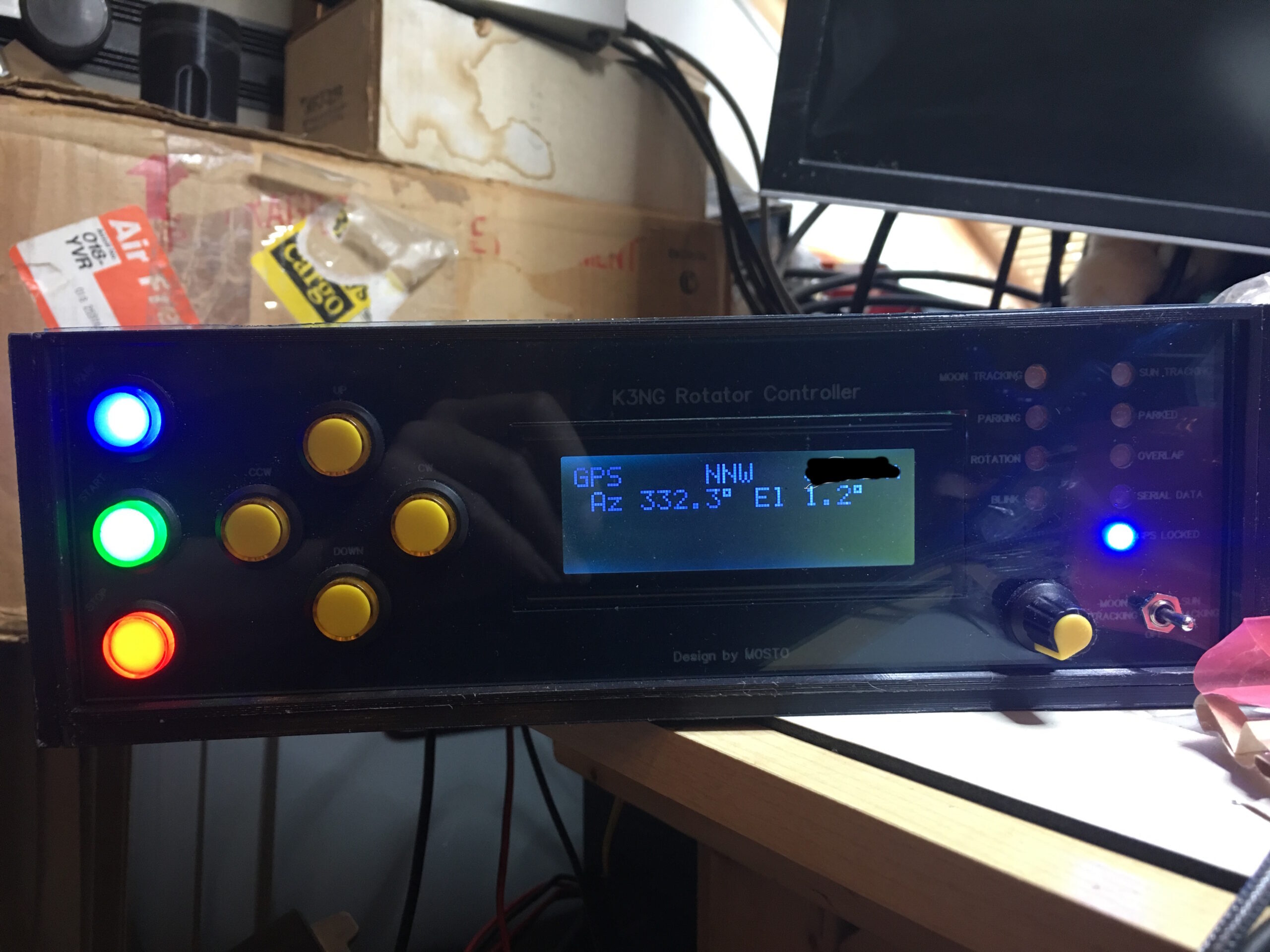
Some images of my complete K3NG controller. Please note the Wemos Mega2560 Wifi is under the prototyping shield, which is in turn under the the relay and connection shield.


In the next few days I hope to publish the full schematic diagrams, Arduino code “including ESP8266”, board images and hopefully the gerber files, cutting templates for the Perspex window, laser cutting template for the backing plate. Then if you are feeling really adventurous!!?? the STL files for a fully 3D printed enclosure. Some of the rear holes are a choice matter and will need to be cut out yourself or adjust the STL to suit. The print was “I think” 25% infill, cubical quad infill, PLA+ silk Black and 0.2mm nozzle with 0.1mm layers. Sliced with Ultimaker Cura 4.6.
So stay tuned!!!
de Spence G5STO
Here is the full write up of my project.
The necessity of computer control over the tracking of some satellites is imperative in this operator’s opinion. The following article deals with a simple computer controlled interface for automatic Up, Down, Clockwise and Counter clockwise rotator movements emulating the well-established Yaesu GS232 protocol. Infinitely expandable and leaves options for a totally homebrew rotator.
It is true that an individual can stand in a field with a handheld radio while pointing an arrow antenna into the sky and with skilful manipulation of Doppler shifting, make perfectly good contacts with the majority of FM satellites. Issues arise when making more difficult SSB contacts, while tracking and tuning. I personally find making SSB satellite QSO’s both challenging and tedious at times due to Doppler shifting and fine tuning, moving antenna position while still trying to jot down call-signs, times and dates etc. all within a very narrow window of opportunity while the satellite is passing overhead. Having a device to ease the burden of just one of the aforementioned tasks has to be welcomed in any good radio shack and why I started out on a journey of test, discovery and a long road of prototyping before I achieved a very basic controller with minimal parts while doing exactly what I required of it; tracking satellites with little or no input from the end user.
If I have to be totally honest, I had discovered the code for the antenna tracking system by chance while looking for Arduino based amateur radio projects. Like many hams that had caught the Arduino/ham bug (mine began in early 2012) this project had me intrigued from day one as it provided me with a solution to one big problem and that is garden space. My garden is a mere 35 feet wide and my Cushcraft ASL2010, albeit aloft on a Clarke SCAM 12 mast is 2 feet wider, either side than my garden. Very sympathetic neighbours meant they didn’t mind this ingress into their property and a provided a sort of easement as long as the antenna wasn’t aloft for months on end. It suited me fine, however, I found this arrangement both impractical and the sheer weight of the mast and antenna made a sizable impression in the lawn. So I guess I had a eureka moment when I discovered the K3NG antenna controller and it had been largely based around an Arduino UNO or Mega 2560. At this point I didn’t even own an azimuth and elevation rotator nor the required 2 meter and 70 centimetre antennas required to work the majority of satellites. Dipping into the bank balance to acquire the funds to at least purchase the rotator and controller (In my case a Kenpro KR5600).
With the controller and rotator bought and my wallet considerably lighter, regardless of the second user price, I set about constructing the K3NG rotator controller. I had been really eager to get this project working but hit hurdles with long delays to shipping from other countries and the fact my Kenpro KR5600 had no computer control port. Kenpro made a few iterations of their azimuth and elevation controller with the KR5400, KR5600, KR5400B and KR5600B. As far as I was aware the ‘B’ meant the required relays internally and external 8 pin din plug meant the control box could be very easily connected to the Yaesu GS232 computer interface and hey presto you now had computer control over your azimuth and elevation rotator and one hand free to tune the radio or jot down callsigns etc. With all of that said, I had bought a controller with no such internal hardware and I had been stuck for a way to control the rotator from the K3NG interface. This was very easily overcome by mounting a 9 pin D-sub socket in the back of my KR5600 and wiring the backs of the switches to the D-Sub connector. In essence this is exactly how Kenpro switch the KR5600B, however they use relays to switch the motors 24VAC voltage taking the large currents away from switching transistors.

The first hurdle was now semi overcome but not to my satisfaction as the switching still relied on transistors without any protection, so I simply invested in a very cheap (£3.75 roughly) 4 relay card with opto-isolation that you may have seen advertised on many electronics websites. Using one of the 9 pins of the D-sub connector, I could then phantom power the relay card, have dedicated opto-isolation and simply switch the control box front switches and maintain Kenpro’s excellent anti-jam idea to prevent Up and Down (or Counter Clockwise and Clockwise) being engaged simultaneously and thus shorting out the motor. As each switch feeds power the next switch via normally closed on a SPDT switch in my case. Later this arrangement included DPDT switches to include limit switches. Early models of Kenpro controllers had no limit switch built into the rotator hardware and the user had to be weary of running the motor into a mechanical stop and potentially destroying the motor or worse the gearing!.
Wires now on the back of each switch it was now impossible to defeat this safeguard and engage CW and CCW simultaneously and the same for Up and Down. Excellent as now one switch prioritises the other. Now it was quite simple to switch the opto-isolated relays from very cheap 2N2222 transistors that are being used as switches with minimal current switching. 1K resistors being used to limit the bias current on the transistors. As soon as the digital pin goes high the transistor is switched and then onward to the relay card and finally the switch. Adding other options such as a 4 bit display the HD44780 16×2 in my very early prototype meant I had eyes on a digital readout of my heading and less reliant on the analogue meters. Remember my early Kenpro KR5600 had no limit switches and azimuth had only been 360 degree capability.
Roll on a few years and my antenna farm had grown to include a Wimo X-quad for 2m and 70cm, two expensive SSB electronics LNA’s for 2m and 70cm and I now had saved up enough pennies for a Yaesu G5500 with a computer control port out of the factory. I believe Yaesu acquired Kenpro in the 1990s, promptly rebranded and then upgraded the design somewhat. Those upgrades included 450 degree capability, limit switches as standard and naturally computer control via an 8 pin din with 4 internal relays. Later Yaesu G5500 models also implemented DC motors, however, my equipment has AC motors. It was obvious to me that now was the time to re-design a perfect piece of equipment that performed flawlessly. Noteworthy is that Anthony Good Mr K3NG himself had supplied many updates via his website to include a multitude of sensors and feedback devices in the libraries, displays, buttons, LED indicators and even satellite tracking built into the firmware. The project simply grew beyond my original controller and my Arduino sketch had grown beyond an UNO and I now realised I needed a minimum of an Arduino Mega 2560 to prevent memory issues. It’s a rather large sketch with the debug routine gobbling up much of that space, hence the need for a Mega 2560 that also had many more digital pins with more analogue pins and four serial ports. All very handy to this growing project.
Down to the hardware! My design had to work with my new Yaesu G5500 but I wanted backwards compatibility with my older KR5600. First off, place the relays on the shield I had started to design. I could then remove the relays from the internals of the KR5600 and wire the switches straight to the 9 pin D-sub connector and remove the phantom power too. It only required one cable change to work with my G5500 too, a bonus. Secondly, the rather tedious 4 bit wiring for Hitatchi HD44780 displays had proven a bit of a pain. Anthony Good (K3NG) had included options of for many displays (even Nextion displays in his latest sketch). Using a DIP – PCF8574 I/O port expander IC meant only 4 wires were needed to power the display and provide the necessary I/O for displaying information. More on the PCF8574 later. It’s very fortunate that you can buy, from various online outlets already configured PCF8574 IC’s on a daughter board with 16 pin holes that wire direct to the back of an existing HD4478 display thus converting it to I2C and more important 4 wires. Third task, buttons and LED’s to take control of the rotator and give haptics to a black box with just a display. For me it was necessary to include a buzzer too for an audio indicator of antenna switching as at the end of each movement a short beep can be heard on completion of movement in any direction. Forth on the list had to be GPS location and time synchronising. Very useful for moon tracking and sun tracking (I’ve lost count of the amount of times people have asked if my K3NG controller can be used to point solar panels towards the sun, the short answer is YES). GPS lock is achieved via a Neo-7 GPS module and an external antenna. Although the NEO-7 comes with a patch antenna, I achieved better results using an external GPS patch antenna with cold locks in under 30 seconds. Moon tracking and Sun tracking followed soon after on a 4 way break before make switch with satellite tracking on the last place. OFF /Moon Tracking/ Sun Tracking/ Satellite Tracking. I have to date had some trouble getting satellite tracking to work and opting for PSTRotator by YO3DMU, computer software do to my tracking for me but the K3NG controller can track satellites direct from firmware but does have issues and I found it tricky to update TLE information too. This is due my laziness rather than problematic firmware, I will one day get round to fixing it though and a work in progress I think.! Anthony Good had to foresight to include port mirroring and then port the GPS sentence’s onward via TX2 and RX2 from the input ports of TX1 and RX1 of the Arduino Mega 2560. This cannot be achieved on the Arduino UNO due to a lack of hardware serial ports. It is also unrealistic to expect good result using software serial without timing issues etc. The data from TX2 and RX2 was now inverted, hence the use of a simple 2N7000 MOSfet and one resistor to invert the data back to a readable format. This can also be achieved using a 2N2222 and two resistors if needed, however, I used a 2N7000 as I had one conveniently on the workbench. A 9 pin D-Sub socket on the rear of the box is the GPS mirrored port.
Fifth on my list, a box and tinkering. Having the hardware all working was great. Backlit buttons for Up, Down, CCW and CW that lit up when there was movement. Park, Start and Stop had the backlight constantly on as they served no purpose blinking them. The code also didn’t allow for this and they would have to be hardware driven and it was overkill in my opinion, the lights remain on. I believe Anthony K3NG had worked hard to replicate all the functions of nearly all models of Yaesu hardware and includes software and hardware for preset as well as speed control via PWM. This basically means that you are able to hook up the K3NG controller to nearly any controller that you feel is necessary, it’s up to the user to design the hardware.
Protocols include Yaesu GS232A and Yaesu GS232B, EasyCom and DCU-1 protocol. A whole host of feedback sensors as Honeywell 3 axis digital compass, DFRobots QMC5883, Adafruit LSM303, Pololu LSM303, QMC5883 using Mechsolution libraries, A2 absolute encoders, Incremental encoders as well as the HH12 AS5045 12 bit rotary encoder and of course a pulse input. Any number of these feedback devices can be used for Azimuth and the sky is the limit to your imagination. It’s very possible to build a complete controller and rotator using slew gears and the feedback equipment above to keep an eye on where you are heading.
Possible elevation hardware includes, ADXL345, Adafruit LSM303, Pololu LSM303, MEMSIC_2125, A2 absolute encoders, Incremental encoders and finally the HH12 AS5045 12 bit rotary encoder, this list isn’t exhaustive by any means and more hardware may have been added since my firmware version which is ‘not’ the latest.
Possible displays, again not exhaustive include, 4 bit, Adafruit I2C (with and without in-built buttons), YourDuino I2C, RFRobot, YWRobot, Sainsmart I2C, Midas I2C and finally the FABO PCF8574 I2C.

I had used the YWrobot and opted for an SMD – PCF8574 which has internally wired address lines A3 to A6 to allow up to 16 Port expander IC’s to be used on the same bus without conflict. The PCF8574 has assignable 7 bit hexadecimal port address without R/W from 0x20h to 0x27h. The PCF8574A has 0x38h to 0x3fh (for my purposes I used the PCF8574 with address 0x27 and my code reflects this address. A0 t0 A2 pins are pulled high with jumpers). There are two versions of data sheet and both make an excellent read eg: TI and NXP, however, the NXP pdf was an easier document to consume and probably better for a beginner to Port expander IC’s.
https://www.nxp.com/docs/en/data-sheet/PCF8574_PCF8574A.pdf
The final part had me scratching my head somewhat. The need for a dainty looking box that didn’t require too much cutting and shaping. I had been very dubious of cutting such a large box for fear of making a mistake so another propeller head moment and I figured I could 3D print a box and pre-form and cut holes etc. Using Fusion 360 and a lot of patience with measuring, I finally had a design which was modular, had a shield that could be hooked up to any host of hardware and so many software elements it was impossible to even implement a quarter of the code. I was happy that my Yaesu G5500 was now being computer controlled with analogue feedback potentiometers that fed 0.1 to 4.8vdc to the A0 and A1 ports of the Arduino mega 2560. Be careful to measure the output voltage of your G5500 if you are going to make this project as anything over 5vdc will blow the ADC of the A0 and A1 on your Mega 2560, you have been warned. I also noted that the feedback pot gave a rather jittery voltage and the LCD would swing by as much as three degrees on the azimuth and two degrees on the elevation. This sometimes caused the rotator to correct itself. This can be trimmed in the code but it was easier to add some caps to suppress the voltage spikes and hence the small filter board I added that I could add different capacitors to and quieten down the voltage. It isn’t perfect but the display has just .5 degrees of jitter now and the code requires more than 1 degree elevation or 2 degrees azimuth before it acts on it so well within tolerance.
The end product needed some finessing and a switch to place a 10uf capacitor in series with the reset line to ground. This supresses reset spikes and prevented the controller resetting with serial connections. Without this capacitor the controller will reset during initialisation and I noticed HRD would completely drop the connection without the 10uf capacitor. Some Arduino boards has a trace over two semi circle shape solder pads with a track that can be cut in between for a more permanent solution but this makes it a pain to update without donning a soldering iron. The switch works well on this occasion. The buzzer also has a header too with goes to another SPDT switch. This allows hardware disabling of the buzzer. This can be done in software but hardware switching makes it easy to mute the buzzer. You can also add a speaker in place of a buzzer and the code allows for different tones and duration. The default I believe is 1khz and 250ms. If the buzzer hasn’t driven you crackers then the clicking of the relays during a 85 degree and above satellite pass surely will.
Internal LED’s and connectors allow for easy diagnosis but this is overkill and my latest controller has been in place for around 5 years or more without issue and on 24/7.
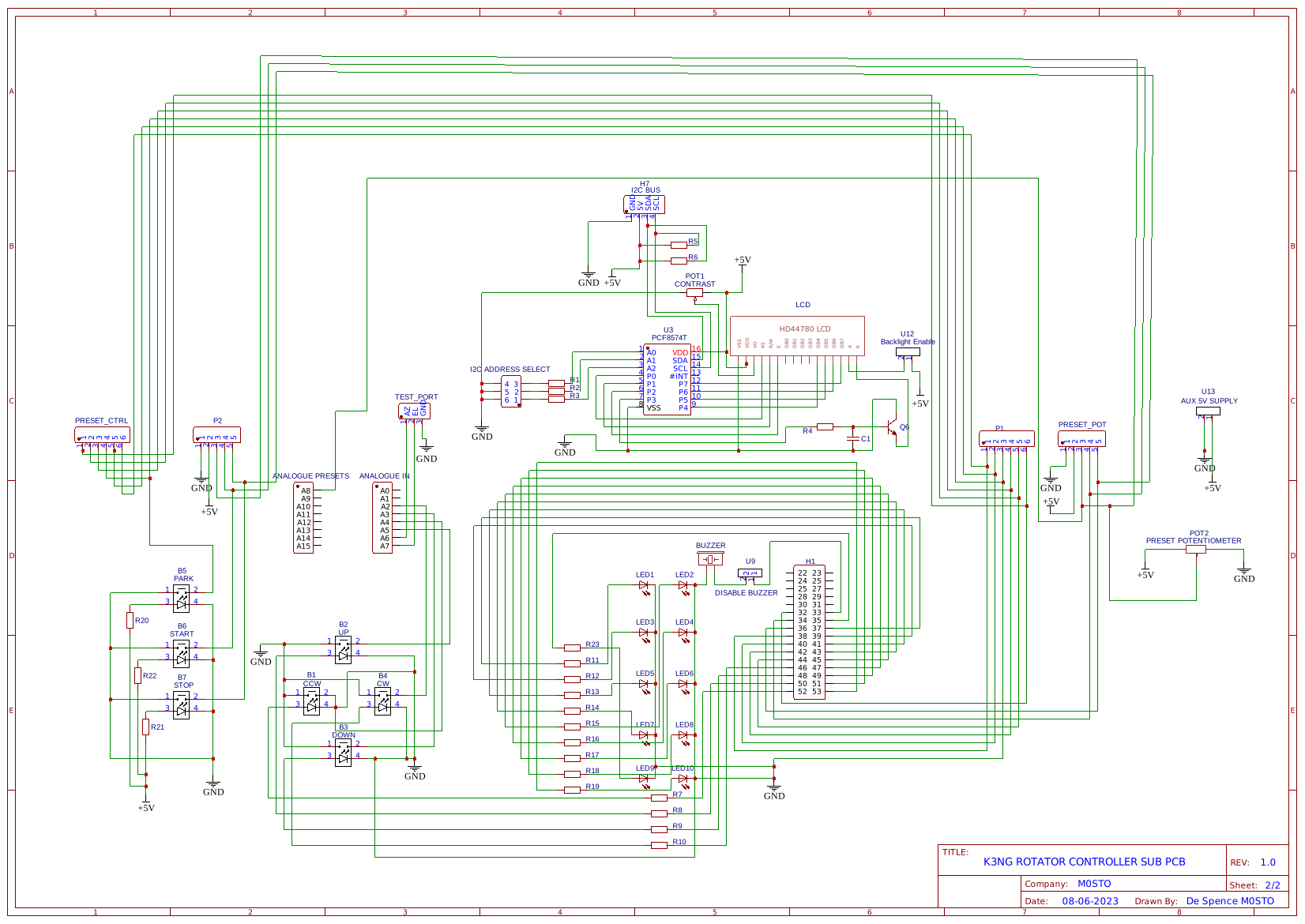
I’ve included links to the modified code to work with my hardware, the Gerber files, the STL for 3D printing and of course schematics which should aid any diagnostics. It’s such Keep It Simple Stupid design with very few components and even less to go wrong. It just has lots and lots of wires and 2.54mm DuPont connectors aid in making the design modular. I didn’t want to make this overly complicated but it just grew and grew and more so the wiring. Much neater I’m sure readers will agree. Tracking satellites such as GreenCube is so much less stress and all hands on the keyboard.
Good luck de Spence G5STO